
Predictive HR Analytics: What It Is, How It Works, and What You Actually Need
What is predictive HR analytics? The 4 types, data thresholds, and 7 leading indicators that work for small businesses under 50 employees.

Every enterprise HR vendor publishes content about predictive HR analytics: how machine learning models can forecast which employees will leave, which candidates will succeed, and where engagement problems will emerge before they become resignations. I build HR software for small businesses, and this is what I would tell another founder before they buy in: what it is, why it fails at small scale, and what to track instead.
Vendor case studies feature companies with 5,000 employees, dedicated data science teams, and six-figure analytics budgets. The technology is real and it works at that scale. The problem is that none of it applies to a business with 25 employees.
If you are running a small company with no HR department, predictive HR analytics is almost certainly not what you need. The math does not work at that scale, the tools are priced for enterprise, and the data requirements are impossible to meet with 3 to 5 departures per year.
What Is Predictive HR Analytics?
Predictive HR analytics is the use of statistical models and machine learning (ML) algorithms to forecast future workforce outcomes based on historical employee data. It sits at the third level of the HR analytics maturity model, above descriptive analytics (what happened) and diagnostic analytics (why it happened), and below prescriptive analytics (what should we do about it).
In practice, predictive HR analytics takes employee data (tenure, compensation, performance ratings, manager changes, training completion, survey responses) and identifies patterns that correlate with specific outcomes. The most common application is flight risk scoring: the model learns which combinations of factors preceded past resignations and flags current employees who match those patterns.
How far you can trust those patterns depends on scale. A company with 5,000 employees, 500 annual departures, and three years of clean data has enough statistical material for machine learning to find real patterns. A company with 25 employees and 3 departures per year does not. That distinction is the core of this article.
Predictive Workforce Analytics, Talent Analytics, and People Analytics
Predictive analytics for human resources is sold under at least four labels, predictive HR analytics among them, and the label tells you what is being predicted rather than how. Predictive workforce analytics usually means forecasting headcount and capacity: how many people the business will need and how many it will lose. Predictive talent analytics points at hiring and internal mobility instead.
Predictive people analytics is the umbrella most vendors have settled on. The distinction matters because the workforce lens is the one that survives at small scale. Projecting how many people you will need next year is arithmetic on a growth plan and an attrition rate, so workforce planning works with the data a 25-person company already has. Naming which individual will leave does not.
The 4 Types of HR Analytics: Where Predictive Fits
HR analytics follows a maturity progression. Each level builds on the previous one, and skipping levels produces bad outcomes. Most small businesses benefit from levels one and two. Most do not need levels three and four.
Most articles make the mistake of treating this progression as a roadmap every company should climb. It is a capability spectrum, and staying at levels one and two indefinitely is appropriate for most small businesses, not a limitation. Descriptive and diagnostic analytics answer the questions that matter at small scale: are people leaving, why are they leaving, and is it getting better or worse?
Why Predictive HR Analytics Was Built for Enterprise, Not Small Business
Predictive analytics requires three things that small businesses do not have: large datasets, long time horizons, and specialized tools. Understanding why helps you avoid spending money and time on something that will not produce useful results at your scale.
| Requirement | Enterprise Reality | SMB Reality (25 employees) |
|---|---|---|
| Minimum dataset for valid model | 250+ employees, 30+ annual departures | 25 employees, 2-4 departures per year |
| Historical data needed | 24+ months of clean, structured data | Most SMBs have inconsistent or no historical data |
| Data quality | Dedicated HR information system (HRIS) with standardized fields | Spreadsheets, scattered files, inconsistent tracking |
| Analytics expertise | Data scientist or People Analytics team | No analytics staff; founder does everything |
| Software cost | Per-employee subscription plus implementation, on an annual enterprise contract | A flat monthly fee for the whole team, not a rate per employee |
| Time to first usable insight | Months of model training and validation | Immediate with simple metric tracking |
| Statistical validity | Large sample sizes enable confidence intervals | 2-4 departures per year = pure noise, no patterns |
The fundamental issue is sample size. Statistical models need enough events to separate signal from noise, and in HR analytics the primary "event" is an employee departure. A company with 25 employees and 10% annual turnover produces 2.5 of them a year.
Project that forward and the problem becomes obvious. At that pace, reaching the 50 termination events a basic attrition model needs would take that company 20 years, and by then the business would have changed so much that its early data would be useless for predicting anything current.
The limit here is arithmetic, not technology. No software, however sophisticated or expensive, can make up for data that does not exist.
 Nick Anisimov, FirstHR founder
How a Flight Risk Model Actually Works
A flight risk model learns which combinations of tenure, pay, and management history preceded past resignations, then scores today's employees against the same pattern. Most coverage stops at "machine learning finds patterns in your data." Knowing what happens underneath is what lets you judge a vendor's claim, and it explains where a threshold like 50 events comes from.
A turnover model starts with a label and a window. The label is a yes/no outcome: did this person voluntarily resign? The window is the period the model predicts over, usually the next three, six, or twelve months. Each employee-month in your history then becomes one row: where that employee stood at that moment, paired with what happened next.
Typical inputs, which modelers call features, are tenure, salary relative to the range for the role, months since the last raise or promotion, the most recent performance rating, manager tenure and manager changes, team size, training completion, and paid time off (PTO) accrued versus used.
The algorithm, usually logistic regression or a gradient-boosted tree (two standard modeling methods), learns which combinations of those features preceded past resignations. It then scores current employees on the same features and returns a probability for each one.


Two properties of a turnover model create its data floor, the least history it can learn from. The first is events per variable: fitting a regression reliably takes roughly ten outcome events per input variable, a rule of thumb traced to Peduzzi and colleagues and still widely advocated in the prediction-model literature.
Run that arithmetic against a real model. Eight features need about 80 resignations before the coefficients, the weights the model gives each feature, stop swinging every time you refit the model on a different slice of the data. Even a stripped-down five-feature model needs about 50. That is where the 50-event minimum in this guide comes from.
The second property is holdout validation: you have to test the model on employees it has never seen. With a 70/30 split, training on most of the data and holding back the rest for the test, 50 events leave just 15 resignations to judge the whole thing on.
Validation is also why 24 months matters as much as event count. Two annual cycles let the model separate a genuine pattern from a bonus-season spike or a summer of graduate departures.
The output is where small samples do the most damage. Suppose you ignored the threshold and ran a model at a 25-person company with three voluntary resignations a year, and suppose it performed respectably by lab standards, catching 80% of leavers while wrongly flagging 20% of the people who stay.
| Step | Calculation | Result |
|---|---|---|
| Employees who will resign this year (12% base rate) | 25 x 0.12 | 3 people |
| Employees who will stay | 25 - 3 | 22 people |
| Resigners the model correctly flags (80% sensitivity) | 3 x 0.80 | 2.4 people |
| Stayers the model flags anyway (20% false positive rate) | 22 x 0.20 | 4.4 people |
| Total names on the high-risk list | 2.4 + 4.4 | 6.8 people |
| Share of the list that actually leaves (precision) | 2.4 / 6.8 | 35% |
Two out of every three people on that high-risk list were never going to leave. Precision does not improve simply because a company is larger: it is driven by the base rate and the quality of the model, not by headcount.
What changes at 5,000 employees is that the model can be trained and validated at all, so its hit rate is a measured number rather than a hope. The response to a flag changes too: it becomes a programmatic nudge rather than a pointed conversation with someone you sit next to.
At 25 people, the same list produces four uncomfortable retention conversations with employees who were perfectly content. The flag also changes how their managers treat them afterwards, which quietly corrupts any attempt to check whether the score was right. That feedback loop is why mature programs validate scores against actual outcomes for months before anyone is allowed to act on them.
The Data Threshold: How Much History Do You Actually Need?
The honest answer is two numbers, and neither is negotiable: roughly 50 termination events and roughly 24 months of continuous records. They come out of the statistics rather than a vendor's system requirements, which is why no amount of budget moves them.
| Company Size | Annual Departures (at 12% turnover) | Years to Reach 50 Events | Predictive Analytics Viable? |
|---|---|---|---|
| 10 employees | 1-2 per year | 25-50 years | No |
| 25 employees | 3 per year | 16-17 years | No |
| 50 employees | 6 per year | 8-9 years | Borderline (marginal data quality) |
| 100 employees | 12 per year | 4-5 years | Possible with clean data |
| 250 employees | 30 per year | ~2 years | Yes, viable starting point |
| 500+ employees | 60+ per year | < 1 year | Yes, standard implementation |
The table makes the verdict plain: for a 25-person company, predictive HR analytics is not premature but mathematically impossible with current data volumes. That does not make workforce data useless at small scale. What fails is the specific technique of predictive modeling, and other analytical approaches (descriptive tracking, diagnostic exit analysis, leading indicator monitoring) produce better results with less data.
Data quality matters as much as data volume. Even companies with 500+ employees fail at predictive analytics when their underlying data is unreliable: missing termination reasons, inconsistent job title coding, gaps in performance review records, or untracked manager changes. If your HR dashboard cannot show clean historical data, predictive modeling will amplify the errors, not overcome them.
6 Use Cases: What Is Viable at Small Scale and What Is Not
Predictive HR analytics has legitimate enterprise use cases. For each one, there is a simpler alternative that works at small scale. What matters is matching the technique to the data you have, rather than reaching for enterprise methods it cannot support.
| Enterprise approach | SMB alternative | Fit | |
|---|---|---|---|
| Turnover / flight risk prediction | ML model scores each employee on likelihood of leaving within 6 months | Quarterly attrition tracking + onboarding completion rates | Enterprise only |
| Hiring success prediction | Algorithm predicts which candidates will succeed based on historical hire data | Structured interviews with scored rubrics | Enterprise only |
| Engagement forecasting | Sentiment analysis across thousands of survey responses | Monthly 1-on-1s with direct questions | Enterprise only |
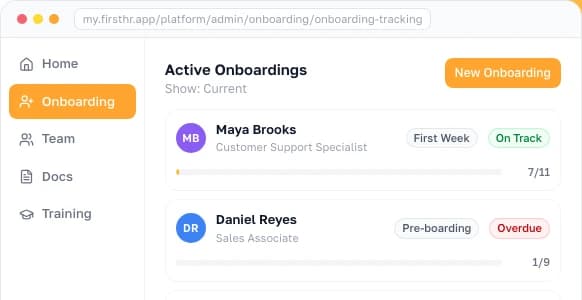
| Onboarding completion tracking | Predictive model identifies at-risk new hires by day 14 | Task completion dashboard in onboarding software | Viable at SMB |
| Compensation equity analysis | Regression model identifies pay gaps across thousands of roles | Annual salary benchmarking with 2-3 sources | Partially viable |
| Succession planning | Talent marketplace with AI-matched internal candidates | Key-person risk list + cross-training plan | Enterprise only |
Onboarding is the clearest case. You do not need a machine learning model to know that a new hire who has not completed any onboarding tasks by day 14 is at risk. You need a checklist and someone who checks it.
7 Leading Indicators That Predict Outcomes Without Machine Learning
These are the metrics that replace predictive analytics at small scale. Each one is a leading indicator: a measurement that changes before the outcome it predicts. When your 90-day retention rate drops, attrition is about to rise. When manager check-ins stop happening, disengagement follows. Spotting these patterns takes consistent tracking, not an algorithm.
The first three metrics (90-day retention, onboarding completion, check-in cadence) matter most. According to Gallup (2019), about a third of all new employees do not last 90 days, which is why the first 90 days is where a small employer's measurement effort pays for itself. Tracking these three every quarter will tell you more than any model your data could support.
All seven metrics can be tracked in a spreadsheet if you are just starting. As the team grows, an HR platform that automatically tracks onboarding completion and check-in schedules eliminates the manual work. FirstHR tracks onboarding tasks against their deadlines and records training completion with a signature, so the numbers behind your onboarding completion rate come from the system, not a manual log.
| A | B | C | D | E | F | G | H | I | |
|---|---|---|---|---|---|---|---|---|---|
| 1 | Indicator | What to count | Target | Q1 | Q2 | Q3 | Q4 | Owner | What we changed this quarter |
| 2 | 90-day retention rate | New hires still employed at day 90, divided by hires who started | > 85% | ||||||
| 3 | Onboarding task completion | Onboarding tasks completed, divided by tasks assigned | > 90% | ||||||
| 4 | Manager check-in cadence | Check-ins actually held, divided by check-ins scheduled | 100% | ||||||
| 5 | Time to productivity | Days from start date to first independent deliverable | < 60 days | ||||||
| 6 | Voluntary turnover | Voluntary departures in the quarter, divided by average headcount | < 5% | ||||||
| 7 | Regrettable attrition ratio | Departures you wanted to keep, divided by all departures | < 20% | ||||||
| 8 | Exit interview themes | Share of departures naming the most common single reason | No cause over 40% | ||||||
| 9 | |||||||||
| 10 | |||||||||
| 11 | |||||||||
| 12 | Quarter reviewed on | ||||||||
| 13 | Worst number this quarter |
Four quarterly columns, a named owner, and one line on what you changed is the entire discipline. That last column is what decides whether the tracker is worth keeping: if a quarter passes with a number below target and nothing written beside it, you are measuring instead of managing.
Nick Anisimov, FirstHR founderWhen You Are Actually Ready for Predictive HR Analytics
Predictive HR analytics becomes viable when three conditions are met simultaneously. Missing any one of them means the investment will not produce reliable results.
| Condition | Threshold | Why It Matters |
|---|---|---|
| Employee count | 250+ employees minimum | Generates enough departure events per year for statistical validity |
| Data maturity | 24+ months of clean, structured HRIS data | Model needs history to find patterns and account for seasonality |
| Analytics capability | At least one person who can interpret model output | Predictions without interpretation lead to worse decisions than no predictions |
When all three conditions are met, the implementation path typically looks like this. Choose a platform with built-in predictive models rather than building your own, and start with a single use case, usually turnover prediction. Check the model's predictions against actual outcomes for 6 months before acting on them, and expand to other use cases only after the first one proves reliable.
For companies approaching the 250-employee threshold, the transition usually begins with upgrading from spreadsheet tracking to a proper HRIS that captures structured data consistently. That foundation matters more than the predictive layer that sits on top of it.
How to Read a Vendor's Predictive Claims
Almost every HR platform sold to small businesses now has an AI or insights tab, and most of them use the word predictive somewhere on the pricing page. Three different things get sold under that label, and only one of them is predictive analytics in the sense described above.
The first is a threshold rule wearing a model's clothes: flag anyone past 18 months of tenure with no raise in the last 12. That is a useful rule and you should probably run it, but it is an if-statement, a fixed condition someone typed in, and it should not carry model pricing.
The second is a benchmark comparison, showing your turnover rate against an industry aggregate. It is genuinely useful for context, but it describes your company rather than your individual employees, and it predicts nothing at all.
The third is a pooled model trained on aggregated data across the vendor's entire customer base, and this is the one legitimate route by which a 25-person company can receive a real predictive score. The training data is not yours, so the events-per-variable problem gets solved somewhere else.
Pooled models come with their own caveats, and they are worth knowing before you sign. The patterns were learned across other employers, so they transfer only as far as your industry, role mix, and pay structure resemble the training population. A model built mostly on salaried tech workers will read a restaurant crew badly.
Validation is the harder problem. Checking whether the scores were right requires your own outcomes, and at three departures a year you will wait years for enough of them to say anything. That is not an argument against pooled scoring, but it is an argument for treating its output as a conversation prompt rather than a finding.
| Ask the vendor | Answer that should stop the conversation | What you are actually checking |
|---|---|---|
| Is the model trained on my data, pooled customer data, or both? | "Both, it blends them" with no split given | With three events of your own, anything learning from your company alone is fitting noise |
| How many termination events are in the training set? | The rep does not know and cannot find out | Event count sets the ceiling on how many features the model can honestly support |
| What is the accuracy, and what base rate is it measured against? | A bare accuracy percentage with no base rate | Accuracy alone is meaningless when the outcome is rare (see below) |
| What is the precision at the threshold you use to flag someone? | Precision is not reported | Precision tells you what share of your high-risk list would have stayed anyway |
| Which input features drive the score? | "That is proprietary" | You cannot screen a black box for protected-class proxies such as zip code, commute distance, or age-correlated tenure |
| Has the tool had an independent bias audit, and can I see it? | No audit, none planned | Required before using an automated tool for hiring or promotion in New York City, and useful evidence anywhere |
| Who inside my company sees the score, and is it stored on the employee record? | Anyone with manager access, stored in the profile | A high flight risk label in a personnel file is discoverable in litigation and changes how the person gets managed |
Take the answers down while the call is happening. A rep who cannot produce a precision figure will produce a reassuring sentence instead, and a week later the two are indistinguishable in your memory.

 Dwight SchruteSales3 people
 Darryl PhilbinWarehouse1 person
 Kelly KapoorCustomer Service1 person
The Legal Exposure Nobody Mentions
A predictive score stops being an analytics exercise the moment it influences an employment decision. Federal law does not distinguish between a ranking produced by a hiring manager and one produced by an algorithm: if a tool is used as a selection procedure, Title VII, the ADA, and the Age Discrimination in Employment Act (ADEA) apply to it.
Disparate impact, where a neutral-looking practice falls harder on one protected group, requires no intent. A model that quietly leans on commute distance, zip code, or continuous tenure can reproduce race or age effects while never touching a protected field.
For race, sex, and ethnicity, the screening test is the four-fifths rule in the federal Uniform Guidelines on Employee Selection Procedures: a selection rate under 80% of the highest group's rate is generally treated as evidence of adverse impact.
The Uniform Guidelines themselves are in flux. A June 2026 opinion from the Office of Legal Counsel at the Justice Department found them unlawful, and the Equal Employment Opportunity Commission's regulatory agenda targets November 2026 for a final rule rescinding them. The disparate-impact provision of Title VII is part of the statute itself, so it still applies whatever happens to the Guidelines.
The ADA angle is the one most often missed in a retention model. Features drawn from absence, leave, or PTO patterns can flag exactly the employees whose absences are disability-related, which turns a retention dashboard into a disability screen without anyone deciding to build one.
Federal agency guidance on AI in employment has been published and then withdrawn as administrations have changed. The statutes underneath it have not moved, and neither has the allocation of risk: the employer that uses a tool answers for its effects, whoever built it, so check whether the vendor contract indemnifies you for a discrimination claim.
State and city rules are the volatile layer. They change every legislative session, so check your own state and any state where a remote employee actually works, since these obligations usually follow the employee's work location rather than the company address.
| Jurisdiction | What it reaches | What it requires |
|---|---|---|
| Federal (Title VII, ADA, ADEA) | Any automated tool used as a selection procedure | No disparate impact on protected classes, accommodation in assessments, and employer liability even when a vendor built the tool |
| New York City (Local Law 144) | Automated employment decision tools used for hiring or promotion | Independent bias audit within the past year, published summary of results, and notice to candidates and employees at least 10 business days before use |
| Illinois (Human Rights Act amendment and the AI Video Interview Act) | AI used in recruitment, hiring, promotion, discipline, or discharge, plus AI-analyzed video interviews | Notice to applicants and employees, plus a ban on tools that produce a discriminatory effect and on zip code as a proxy for a protected class, in force since January 1, 2026. The separate video interview law adds consent and deletion rights and has applied for years longer |
| Maryland | Facial recognition technology used during interviews | The applicant's signed written consent waiver before the technology is used |
| Colorado (Senate Bill 26-189) | Automated decision-making technology used in consequential decisions, employment included | From January 1, 2027: notice when a system interacts with someone, a plain-language explanation within 30 days of an adverse outcome, a right to request meaningful human review, and compliance records kept at least 3 years |
| California (FEHA automated-decision rules) | Automated-decision systems used in employment decisions | In force since October 1, 2025: FEHA anti-discrimination duties reach the system and its selection criteria, and employment records including automated-decision data are kept 4 years |
Colorado's regime moved during 2026. The state repealed and reenacted its 2024 AI Act with Senate Bill 26-189, signed May 14, 2026. Its duties for developers, who build these systems, and deployers, the businesses that use them, apply alike from January 1, 2027, to consequential decisions made on or after that date.
California moved earlier and more quietly. The Civil Rights Council rules under the state's Fair Employment and Housing Act (FEHA) have applied since October 1, 2025, and their 4-year retention duty covers the data an automated-decision system takes in and puts out, plus any data used to customize it for your company.
Containing this risk at small scale is simple. Keep any score advisory: use it to prompt a conversation, never as an input to pay, promotion, discipline, or layoff selection. The moment it touches one of those, you own it, and if a claim reaches court, you will be asked in discovery to produce the feature list, the audit, and the decision rule.
The rest is bookkeeping you do before the first score arrives. Decide who can see scores, keep them out of the personnel file, and write down how long you retain them. If you cannot answer "what did this tool consider and who acted on it," you are not ready to run it at any headcount.
Common Mistakes When Approaching HR Analytics at Small Scale
The mistakes below are category errors rather than analytical ones: reaching for an enterprise technique the data cannot support, or measuring in place of deciding. Each one is cheap to avoid and expensive to discover a year in.
| Mistake | Why It Happens | The Fix |
|---|---|---|
| Buying enterprise analytics software for a 30-person team | Vendor marketing makes predictive seem essential | Start with descriptive metrics in a spreadsheet. Upgrade when the data justifies it. |
| Treating 2-3 departures as a trend | Pattern-seeking bias makes small samples feel meaningful | Wait for 5+ data points before drawing conclusions. Track quarterly, not per-event. |
| Skipping descriptive and diagnostic analytics | Predictive sounds more sophisticated and valuable | You cannot predict what you do not measure. Track the basics first. |
| Ignoring data quality while pursuing analytics | Excitement about insights overshadows data hygiene | Clean, consistent data in a simple system outperforms dirty data in an advanced one. |
| Using analytics as a substitute for conversations | Dashboards feel more objective than asking people | At 20 employees, a direct conversation is faster and more accurate than any model. |
| Measuring everything without acting on anything | More metrics feels like more progress | Track 3-5 metrics. Act on the worst one. Repeat. |
The underlying mistake behind most of these is confusing sophistication with effectiveness. At small scale the best analytical tool is a short list of leading indicators, a quarterly review habit, and a willingness to act on whichever number looks worst.
Cost is what makes that discipline worth keeping. According to SHRM (2022), the average cost per hire ran close to $4,700 in recruiting spend alone, so every analytical dollar should go toward preventing the departures that trigger replacement costs.

Frequently Asked Questions
What is predictive analytics in HR?
Predictive analytics in HR is the practice of feeding past employee records into a statistical or machine learning model so it can estimate future workforce outcomes. Its most familiar form is the flight risk score: the model studies people who resigned before, looking at factors such as tenure, where their pay sat in the range, how long they went without a promotion, and whether their manager changed, and then gives each current employee a percentage chance of leaving. The same approach drives hiring success models, which rank candidates by likely performance, and engagement forecasting, which tries to flag a problem before the next survey does. Every one of these depends on the data behind it. A model needs enough finished outcomes to separate a pattern from coincidence: roughly 50 termination events, plus about 24 months of consistent records. That floor comes from statistics rather than from a pricing plan, which is why the technique suits organizations of about 250 employees or more.
What are the 4 types of HR analytics?
The four types are descriptive, diagnostic, predictive, and prescriptive analytics, and each one takes on a harder question than the last. Descriptive work reports what happened: headcount, turnover rates, and basic demographics. Diagnostic work explains why, mostly by comparing exit conversations and looking for causes that repeat across departures. Predictive work estimates what comes next with models trained on past outcomes, and prescriptive work goes a step further by recommending a specific intervention for each person. Many guides treat the sequence as stairs every company must climb, but it is better read as a range of capabilities, and stopping partway is a legitimate choice. For a small employer, the first two levels already cover what it most needs to know: whether people are leaving, what is pushing them out, and whether the numbers are improving. A company can stay at descriptive and diagnostic for good and still decide better than a competitor relying on a model trained on too little data.
Can small businesses use predictive HR analytics?
Usually not, because the barrier is arithmetic rather than money. A statistically valid attrition model needs roughly 50 termination events to learn from, plus 24 months of clean employee records. A 25-person company that loses three to five people a year collects only a sliver of that, so whatever a model finds there could just as easily be chance, and the software will report that chance with the same confidence as a real pattern. A wrong prediction does more harm than none at all, because someone acts on it. One exception deserves a mention: a pooled model built on data from all of a vendor's customers, which borrows the missing sample from other employers. That route can produce a legitimate score, but your own departures will take years to show whether it is right, so treat the score as a reason to talk with someone, not as a conclusion.
What is an example of predictive HR analytics?
Picture an employer with 5,000 people feeding two years of records into a model: tenure, compensation history, performance ratings, manager changes, commute distance, and promotion history. The model learns that people who have gone more than three years without a promotion, changed managers recently, and sit below the median for their role resign far more often than the rest, and it scores everyone on that pattern. HR then routes retention conversations and compensation reviews to the highest scores. Three things make that work, and all three are absent at 25 employees: enough completed departures to train on, records consistent enough to trust, and a person who can read a precision figure and decide whether the list is worth acting on. Strip any one of them out and the exercise produces a ranked list of names with nothing behind it.
How much data do you need for predictive HR analytics?
You need about 50 termination events and about 24 months of continuous, clean records, and each number has its own reason. The event figure follows the events-per-variable rule of thumb: a regression wants around ten outcomes for each input it weighs, so even a slim model with five inputs needs 50 resignations before its estimates stop shifting. The time requirement is separate. With only one year of history, a model has no way to know whether a cluster of exits was a real trend or just a spike after bonuses are paid or a wave of summer departures. For a 30-person company losing 10% of its staff each year, that works out to three departures annually and more than 16 years to reach that minimum. By then the company would look so different that its oldest records would no longer describe it.
Is predictive HR analytics worth the cost for small businesses?
No, and the cost is the second reason rather than the first. Enterprise people-analytics platforms are priced per employee per month on annual contracts, sit on top of a properly maintained HRIS, and assume somebody in the building can interpret the output. Even setting price aside, the software cannot work at small scale, because the data to train it does not exist. Money spent there buys a dashboard whose predictions are unvalidated and unvalidatable. The better use of the same budget is a flat-fee HR platform that captures onboarding completion, retention past 90 days, and whether scheduled manager check-ins are actually happening. Those three numbers are observable from the first hire, they move before attrition does, and acting on them does not require anyone to trust a black box.
What should small businesses track instead of predictive analytics?
Track seven leading indicators, and keep them in a simple spreadsheet. Start with retention at 90 days, the share of new hires still on the payroll at that point, and aim above 85%. Add onboarding completion, finished tasks as a share of assigned ones, with a goal above 90%. Watch manager check-ins held as a share of those scheduled, since anything below 100% is a warning. Measure how many days pass before a new hire delivers a first piece of work without help, aiming under 60. Then compare voluntary departures with average headcount every quarter instead of once a year, note what share of leavers you would have wanted to keep, and record the most common single reason people give when they leave. If one reason accounts for more than 40% of exits, treat it as a systemic problem, not bad luck. All seven shift before attrition does, which is exactly what makes them leading indicators.
Make HR the easy part of running your business
Onboarding, e-signatures, training and core HR in one place. Up and running in 5 minutes.
- 7-day free trial
- No credit card required
- Cancel anytime