
Technical Skills: What They Are, Examples by Industry, and How to Develop Them
What are technical skills? Definition, 6 categories, 40+ examples by industry, technical vs soft skills, and how to build technical skills into onboarding.

Technical Skills
What they are, examples by industry, and how to develop them at your business
When I hired my first developer, the interview went well. He could talk about architectures, debate framework choices, and whiteboard algorithms. He passed every technical question. Then he started, and I discovered that "knows React" and "knows how to build features in our React codebase with our conventions, our deployment process, and our testing framework" are two completely different things. The gap between general technical skills and company-specific technical application is where most onboarding failures happen.
Technical skills are the baseline: nobody can do the job without them. The harder part is knowing which technical skills matter for each role, verifying them during hiring, closing the gaps during onboarding, and keeping them current as technology changes. Get that right and new hires become productive in weeks. Get it wrong and they are still figuring things out in month four.
This guide covers what technical skills are, how they differ from soft skills, the six major categories with examples across industries, which skills are most in demand, how to assess and train them, and how to build technical skills into your onboarding workflow.
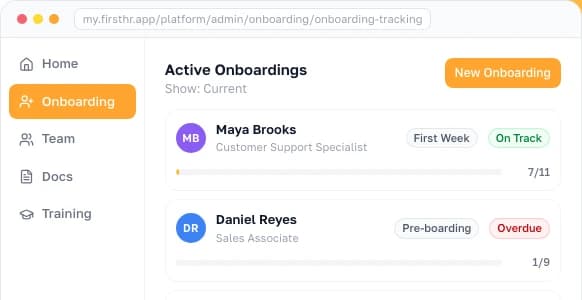
I built training modules into FirstHR because the training portion of onboarding is where technical skills transfer actually happens, and without a system to deliver, track, and verify that training, it either gets skipped or delivered inconsistently.
What Are Technical Skills?
Technical skills are the specialized knowledge and abilities required to perform specific tasks within a job or profession. They are learned through education, training, certifications, or hands-on experience. They are measurable, testable, and typically role-specific: the technical skills a software developer needs are different from those a nurse needs, which are different from those an electrician needs.
Technical skills have three defining traits. They are learnable through structured training (unlike personality traits), measurable through assessments or practical demonstrations (unlike "communication skills"), and specific to tasks or domains (unlike general cognitive abilities).
A person either can or cannot write a SQL query, operate a forklift, or perform a blood draw. That yes-or-no quality of basic technical skills makes them easier to assess during hiring and easier to train during onboarding than soft skills.
That said, proficiency exists on a spectrum. "Knows Excel" could mean anything from sorting a column to building complex financial models with VBA macros. When employers talk about technical skills, specifying the proficiency level matters as much as naming the skill itself.
What Technical Proficiency Means
Technical proficiency is the level at which someone applies a skill, not whether the technical ability is there at all. Two people can both put SQL on a resume while one writes a simple SELECT and the other rewrites a query that runs across millions of rows. Naming the level is what makes a skill hireable and trainable.
Three levels are enough for a small business, and the same three should carry through the whole process. Write the level you need next to each skill in the job description, use it when you assess candidates, and reuse it during onboarding so a training plan has a finish line instead of a vague sense that someone is getting better.
| Level | What the person can do | How you verify it |
|---|---|---|
| Basic | Uses the tool for routine tasks with the process written down, and escalates anything unusual | Completes a real task alone with the standard operating procedure (SOP) open |
| Intermediate | Troubleshoots: handles the exceptions and fixes what breaks without asking | Repairs a broken case you set up and explains what went wrong |
| Advanced | Builds the process from scratch, improves it, and teaches it to someone else | Trains a colleague whose work then meets the standard |
Technical Skills vs Soft Skills
Technical skills and soft skills are complementary, not competing. A developer with perfect coding skills but no ability to communicate with the team ships the wrong features. A project manager with exceptional communication but no understanding of the tools produces plans that do not work in practice. Every role requires both. The question for employers is what ratio to hire for and how to train the gaps.
| Dimension | Technical Skills | Soft Skills |
|---|---|---|
| Definition | Specialized abilities for specific tasks | Interpersonal and behavioral qualities |
| Examples | Python, accounting software, CNC operation, SQL | Communication, leadership, adaptability, teamwork |
| How they are learned | Education, certifications, training, practice | Experience, coaching, mentoring, self-awareness |
| How they are measured | Tests, certifications, practical demonstrations | Behavioral interviews, peer feedback, observation over time |
| Transferability | Portable within the same domain; company-specific application varies | Highly transferable across roles and industries |
| Shelf life | Varies: months for fast-changing tech, years for stable domains | Long-lasting; interpersonal skills rarely become obsolete |
| Training approach | Structured courses, documentation, hands-on practice | Coaching, role-playing, feedback loops, mentoring |
| Hiring assessment | Work samples, skills tests, portfolio review | Behavioral questions, reference checks, trial periods |
For a small, growing business, the practical framework is this: hire for soft skills that are hard to train (integrity, adaptability, self-motivation) and train for technical skills that are learnable (your specific tools, your processes, your industry requirements). The exception is roles where technical skills are the entire job: a welder needs to weld before you can teach them your communication standards.
6 Categories of Technical Skills
Technical skills fall into six categories: software and programming, data and analytics, equipment and machinery, industry certifications, digital tools and platforms, and technical writing and documentation. They span far beyond technology, because every industry has its own technical requirements. Sorting them into categories helps employers identify what their roles actually require rather than defaulting to a generic skills list.
The most common error employers make with technical skills categories is focusing only on the first two (software and data) while ignoring categories that are equally critical for their business.
A small manufacturing company needs equipment operation and safety protocol skills more than it needs programming skills. A medical practice needs electronic medical record (EMR) proficiency and clinical procedure skills more than it needs data analytics. Start with what your business actually does, not with what technology articles tell you is "in demand."
Technical Skills Examples by Industry
The examples below organize technical skills by industry rather than by skill type, because that is the view employers need when deciding what to hire for and train on. Each row lists the skills that most frequently appear in job descriptions, onboarding training plans, and performance assessments for that industry.
| Industry | Core Technical Skills | Common Tools/Platforms |
|---|---|---|
| Technology / SaaS | Programming languages, version control (Git), CI/CD, API development, database management, cloud infrastructure, testing frameworks | GitHub, AWS/GCP/Azure, Docker, Jira, VS Code, PostgreSQL |
| Healthcare / Medical | Patient assessment, vital signs monitoring, EMR documentation, specimen collection, medication administration, infection control | Epic, athenahealth, other EHR platforms, medical devices, lab equipment |
| Finance / Accounting | Financial modeling, tax preparation, auditing, regulatory compliance, bookkeeping, payroll processing, financial reporting | Accounting software, Excel (advanced), Bloomberg, ERP systems |
| Manufacturing | Equipment operation, quality control, blueprint reading, CNC programming, welding, safety protocols (OSHA), lean methodology | CAD/CAM, ERP systems, SCADA, PLC programming, CMM |
| Construction / Trades | Blueprint reading, building codes, equipment operation, electrical systems, plumbing, HVAC installation and repair | AutoCAD, Procore, estimating software, specialty hand tools |
| Marketing / Sales | SEO, PPC advertising, marketing automation, CRM management, copywriting, analytics interpretation, A/B testing | HubSpot, Google Analytics, Salesforce, Mailchimp, Ahrefs |
| Legal | Legal research, contract drafting, regulatory compliance, case management, e-discovery, document review | Westlaw, LexisNexis, Clio, iManage, document management systems |
| Hospitality / Food Service | Food safety (ServSafe), POS system operation, inventory management, reservation systems, allergen protocols | POS systems, OpenTable, inventory management software |
For any role at any company, the practical exercise is straightforward. List the tasks the person does daily, identify the technical skills each task requires, and document the specific tools and systems involved. That list becomes the technical skills section of your job description, the basis for your interview assessment, and the framework for your onboarding training plan.
Most In-Demand Technical Skills
The table below covers eight areas where technical skills are in high demand, from AI and machine learning to skilled trades and healthcare technology. Demand shifts as technology and industries change, so use the trends to plan hiring and training, but let your own industry and roles decide which of these skills matter most.
| Skill Area | Growth Driver | Relevance for SMB |
|---|---|---|
| AI and machine learning | Every industry integrating AI tools into workflows | High: using AI tools for content, analysis, customer service; low: building AI systems |
| Data analysis and visualization | Data-driven decision-making across all business functions | High: every business benefits from understanding their numbers |
| Cloud computing (AWS, Azure, GCP) | Business migration from on-premise to cloud infrastructure | Medium: relevant for tech companies; most SMBs consume cloud, not build on it |
| Cybersecurity | Increasing threat landscape and regulatory requirements | Medium: every business needs basic security practices; dedicated roles are enterprise |
| Digital marketing (SEO, automation) | Online customer acquisition and retention | High: most SMBs need these skills for growth |
| Skilled trades (HVAC, electrical, plumbing) | Aging workforce creating massive replacement demand | High: trades businesses face the sharpest technical skills shortages |
| Healthcare technology (EMR, telehealth) | Digitization of healthcare delivery and records | High: medical practices need staff proficient in these systems |
| Project management tools | Remote and hybrid work requiring structured coordination | High: any team coordinating more than a few people benefits from structured PM |
Reading that table as a shopping list is the wrong instinct at small scale. AI technical skills training at a small company does not mean hiring AI engineers. It means making sure the people already on payroll can use AI-powered tools inside their existing roles: for customer support, content creation, data analysis, and process automation.
Technical Skills and Employee Onboarding
Technical skills training during onboarding is where the gap between "can do the job in general" and "can do the job here, with our tools, following our processes" gets closed. A new hire brings portable technical skills (SQL, customer service, equipment operation). Onboarding adds company-specific technical application (our database schema, our customer escalation process, our specific equipment models).
| Onboarding Phase | Technical Skills Focus | Verification Method |
|---|---|---|
| Pre-boarding (before Day 1) | Provide access to tool documentation, system login credentials, and self-paced learning materials | Confirmation of account setup and access |
| Week 1 | Tool-specific training: CRM, project management, communication platforms, and role-specific software | Can navigate core tools independently; complete a guided task |
| Weeks 2-4 | Process-specific training: how we do things here with these tools. SOPs, workflows, and procedures | Complete a real task independently with quality review |
| Days 30-60 | Advanced skills: edge cases, troubleshooting, optimization, and efficiency techniques | Handle common problems without escalating; meet quality benchmarks |
| Days 60-90 | Independent operation: apply technical skills without supervision across the full scope of the role | Consistently produces work that meets standards without review |
The mistake most small businesses make: treating technical skills training as a single event ("here is how to use the CRM, let me know if you have questions") rather than a progressive, verified process. A new hire who receives a 30-minute CRM walkthrough on Day 1 and is expected to use it independently by Day 2 will develop workarounds and bad habits that are harder to correct later than to prevent.
How to Assess Technical Skills
Assessing technical skills effectively requires more than asking candidates to rate themselves on a 1-to-5 scale. Self-assessments are unreliable for two reasons. People tend to hold overly favorable views of their own abilities, as Cornell psychologists Justin Kruger and David Dunning found in research published in 1999. The word "intermediate" also means something different to every person who uses it.
Four Assessment Methods, Ranked by Reliability
| Method | How It Works | Best For | Limitation |
|---|---|---|---|
| Practical work sample | Give the candidate a task representative of the actual job and evaluate the output | Any role with producible output: code, designs, reports, analysis | Time-consuming for both candidate and evaluator |
| Technical interview | Structured questions from a domain expert that probe depth of knowledge | Roles where knowledge is as important as execution | Depends on interviewer quality; can test knowledge without application |
| Skills test | Timed assessment of specific technical competencies using a testing platform | High-volume hiring where consistent measurement matters | Tests may not reflect real job conditions; can be gamed |
| Portfolio and credential review | Evaluate certifications, past projects, code repos, or documented work history | Creative, engineering, and credentialed roles | Does not verify current proficiency; past work may not be representative |
For a small business without a dedicated recruiter, the most practical approach is a structured work sample. It takes 30 to 60 minutes and tells you more about a candidate's technical capability than an hour of interview questions.
Ask the candidate to complete a task that mirrors what they would do in the first week on the job: build a report in your actual tool, troubleshoot a real (sanitized) problem, or walk through how they would handle a specific scenario.
The work sample only beats the interview if you write down what you saw. Record the result on the same form for every candidate, immediately after the task, so the comparison at the end of the process is between notes rather than between memories. The record below also doubles as the starting point for the new hire's training plan, because the gaps you list in it are exactly what onboarding has to close.
How to Train Technical Skills at a Small Business
At a small business, technical skills training runs on five practical methods: screen recordings, written procedures, shadowing, external certifications, and the training your software vendors provide. You have no learning and development (L&D) department, no per-employee training budget, and no dedicated trainer, so technical skills training is whatever you or a manager can put together. Each method below works at that scale.
Five Training Methods That Work Without an L&D Department
| Method | How It Works | Cost | Best For |
|---|---|---|---|
| Screen recordings of tool workflows | Record yourself doing the task, narrating each step. Store in a shared folder or training module. | Free (Loom, OBS) | Tool-specific processes: CRM, accounting, project management |
| Written SOPs with screenshots | Document step-by-step procedures with annotated screenshots for each step | Free (Google Docs + screenshot tool) | Repeatable processes that change infrequently |
| Shadowing with structured notes | New hire observes experienced employee doing the task, takes notes, then tries it with supervision | Staff time only | Complex tasks that involve judgment, not just procedure |
| External certifications | Enroll employees in industry certifications (AWS, Google Analytics, ServSafe, etc.) | Varies by credential (AWS exams cost $100-$300 each) | Industry-standard skills that validate competence externally |
| Vendor training resources | Use the training materials provided by your software vendors (help docs, webinars, certification courses) | Usually free with subscription | Software tools: CRM training from Salesforce, accounting training from your accounting software provider |
In a SHRM interview on frontline learning (April 2026), a learning-platform executive makes the case for microlearning delivered between shifts, training personalized to each role, and programs designed backward from measurable business outcomes.
For a small business, the practical version is short, focused training modules (5 to 15 minutes each) that employees can complete during natural breaks in their work, rather than multi-hour training sessions that disrupt productivity.
The US Department of Labor Registered Apprenticeship model pairs structured on-the-job training under an experienced mentor with supplemental classroom instruction built around the training needs of the employer. The department says a wide range of industries now use the model.
Any small business can copy the part that matters, with or without registering a program: mentored work paired with structured instruction. Structured on-the-job training with documented learning objectives, scheduled checkpoints, and progressive responsibility produces better outcomes than unstructured "figure it out" approaches.
Building a Technical Skills Matrix for Your Team
A technical skills matrix maps which skills each role requires and which skills each person currently has. It sounds like an enterprise exercise. At a small business, it is a one-page spreadsheet that prevents the founder from being the only person who knows what everyone should be able to do.
| Role | Core Technical Skills Required | Proficiency Level Needed | Current Team Coverage |
|---|---|---|---|
| Operations Manager | ERP system, inventory management, vendor portal, data reporting | Advanced ERP, Intermediate reporting | 1 person (single point of failure) |
| Customer Success Rep | CRM (deal management, reporting), support ticketing, product demo | Advanced CRM, Intermediate product knowledge | 2 of 3 reps are proficient |
| Developer | React, Node.js, PostgreSQL, Git, CI/CD, AWS | Advanced in primary stack, Intermediate in ops | Both developers cover core stack |
| Office Manager | Accounting software, Google Workspace, HRIS, benefits portal, document management | Advanced accounting software, Intermediate everything else | 1 person (single point of failure) |
The matrix reveals two critical things: single points of failure (roles where only one person has the technical skills) and training priorities (the biggest gaps between what roles require and what people currently have). For a small team, building this matrix takes about an hour and immediately clarifies where to focus training investment.
T-Shaped Skills: Depth in One Area, Breadth Across Several
T-shaped skills describe a profile with deep expertise in one technical domain and working competence across several adjacent ones. The vertical bar is the depth that makes someone the person everyone goes to for a specific thing. The horizontal bar is the breadth that lets them cover, question, and work alongside the rest of the team.
| Profile | What it looks like | Where it helps and where it hurts |
|---|---|---|
| I-shaped | Deep in one domain, little competence outside it | Fastest inside the specialty; one absence stops the work entirely |
| T-shaped | Deep in one domain, working competence across adjacent ones | Covers gaps and collaborates well; depth grows more slowly |
| Comb-shaped (sometimes called M-shaped) | Deep in two or three domains, breadth across the rest | Rare and expensive to hire; usually built over years inside one business |
At a small business the horizontal bar is what removes the single points of failure the matrix just exposed. An office manager who is advanced in bookkeeping and basic across the HR information system (HRIS) and the benefits portal keeps the week running when a colleague is out. Cross-training is how that bar gets built, and it costs far less than hiring a second specialist.
AI and the Changing Technical Skills Landscape
AI is changing technical skills requirements in two simultaneous directions. Some technical skills are becoming less critical because AI handles them (basic data entry, routine code generation, standard document formatting). Other technical skills are becoming more critical because they involve working alongside AI (prompt engineering, AI output evaluation, understanding AI limitations, integrating AI tools into workflows).
| Shift | Skills Decreasing in Demand | Skills Increasing in Demand |
|---|---|---|
| Content creation | Basic copywriting, routine data summarization | AI prompt engineering, output editing and fact-checking, creative direction |
| Software development | Boilerplate code writing, simple bug fixes | Code review of AI output, system architecture, complex problem-solving |
| Data analysis | Manual data cleaning, basic reporting | Advanced statistical interpretation, AI model evaluation, data strategy |
| Customer service | Scripted response handling, FAQ answering | Complex problem resolution, empathy-based de-escalation, tool orchestration |
| Administrative work | Manual scheduling, routine document processing | Workflow automation, AI tool configuration, process optimization |
For small businesses, the practical move is to make sure employees can use AI tools effectively within their existing roles, rather than chasing AI-specific technical skills in hiring.
Picture a marketing person who uses AI to get a first draft on the page in minutes, an operations manager who uses it to analyze vendor costs, or a customer service rep who drafts responses with it and then personalizes them. Those are the AI-adjacent technical skills that produce immediate ROI at small scale.
SHRM recommends incorporating multiple learning formats into development programs to reach diverse learners. For AI-related technical skills specifically, this means combining hands-on tool usage (let employees experiment with AI tools on real tasks) with structured training (what AI can and cannot do, how to evaluate output, when not to use it).
Common Mistakes with Technical Skills
Six mistakes appear consistently across small businesses managing technical skills. All of them are avoidable with basic structure.
The fix for all six mistakes starts in the same place. Pick one role, write down the tools and skills it needs and the level each one requires, and check the people doing that job against the list. The gaps you find become your first training plan, and the same list sharpens the next job description you write for that role.
Frequently Asked Questions
What are technical skills?
Technical skills are the specialized know-how and abilities a person needs to carry out particular tasks in a job, such as writing code in a programming language, running a piece of equipment, analyzing data, or working in software built for one industry. People pick them up through schooling, training programs, certifications, or hands-on practice, and you can test and measure them directly. That sets them apart from soft skills like communication, leadership, and teamwork: a technical skill is tied to a specific task, can be taught with structured training, and can usually be confirmed with a certification or a practical assessment.
What is the difference between technical skills and soft skills?
Technical skills are task-specific abilities that can be taught, measured, and certified: programming in Python, operating a CNC machine, or creating financial models in Excel. Soft skills are interpersonal and behavioral qualities that are harder to measure: communication, leadership, adaptability, and teamwork. Both are essential for job performance. Technical skills determine whether someone can do the work. Soft skills determine whether they can do the work effectively within a team and organization. Most roles require a combination of both.
What are examples of technical skills?
Technical skills vary by industry and role. In technology: programming languages, cloud computing, database management, cybersecurity, and DevOps. In healthcare: patient assessment, medical record systems (EMR), diagnostic equipment operation, and clinical procedures. In finance: financial modeling, regulatory compliance, accounting software, and data analysis. In manufacturing: equipment operation, quality control, CNC programming, and safety protocols. In marketing: SEO, analytics platforms, CRM systems, and content management systems. The common thread is that all are learnable, measurable, and specific to performing job tasks.
How do you develop technical skills?
Technical skills develop through five main channels: formal education (degree programs, vocational schools), professional certifications (AWS, PMP, CPA), on-the-job training (learning by doing under supervision), self-directed learning (online courses, documentation, tutorials), and structured onboarding programs (company-specific training during the first 90 days). For employers, the most effective approach combines structured training materials with hands-on practice and mentoring from experienced team members.
Why are technical skills important for employers?
Technical skills directly determine whether employees can perform their job functions. An accountant who cannot use accounting software, a developer who cannot write code in your tech stack, or a nurse who cannot operate monitoring equipment cannot do their job regardless of their soft skills. For employers, technical skills matter in three contexts: hiring (can this person do the job?), onboarding (how quickly can we get them productive with our specific tools and processes?), and development (how do we keep skills current as technology changes?). Onboarding is where most employers lose time, because a hire who knows a tool in general still has to learn how your company uses it. Get all three contexts right and new hires become productive in weeks instead of still figuring things out in month four.
What technical skills are most in demand?
The Bureau of Labor Statistics 2025-35 employment projections put data scientists among the fastest-growing occupations in the country at 34.6 percent, with computer and information research scientists at 21.8 percent, against 3.5 percent growth across all occupations combined. Beyond technology, healthcare technical skills (patient care procedures, EMR systems), skilled trades (HVAC, electrical, plumbing), and digital marketing skills (analytics, automation, CRM) are consistently in demand. For small businesses specifically, the most valuable technical skills are often practical rather than cutting-edge: proficiency with your CRM, your project management tool, your accounting software, and your industry-specific equipment.
How do you list technical skills on a job description?
Separate technical skills into required (must-have to perform the job) and preferred (would accelerate productivity). Be specific: 'can reconcile bank accounts and close the month in our accounting software' is more useful than 'accounting software experience.' Include proficiency levels when relevant: 'intermediate SQL (can write joins and subqueries)' versus just 'SQL.' List 5-8 technical skills maximum to avoid discouraging otherwise qualified candidates. Group them by category if the role spans multiple technical domains.
How do you assess technical skills during hiring?
Use methods that make the candidate show the skill rather than describe it. Ranked from most to least reliable, the four main options are a practical work sample, where the candidate does a job-like task and you judge the result; a technical interview run by someone who knows the domain, with structured questions that test how deep the knowledge goes; a timed skills test on specific competencies; and a review of the portfolio and credentials, such as certifications, past projects, or code repositories. A reference check that asks directly about technical capabilities gives you a fifth data point. Do not lean on self-reported skill levels alone, since people tend to rate their own abilities more generously than their work supports.
How often should technical skills training be updated?
The update frequency depends on how fast the underlying technology changes. Software tools and digital platforms: review training materials after every major software update and at minimum annually. Industry regulations and compliance procedures: update immediately when regulations change. Equipment and machinery: update when new equipment is installed or operating procedures change. General technical skills (data analysis, programming): review annually for relevance. The practical trigger: if more than one employee asks how to do something that the training materials do not cover, the training needs updating. Technical skills go stale faster than soft skills because the tools they apply to keep changing, so a CRM workflow that was current before an upgrade can be obsolete after it. An annual technical skills review on the calendar catches whatever the triggers miss.
Can technical skills be learned on the job?
Yes, and for many roles this is the primary learning method. On-the-job technical skills training works best when it is structured: documented procedures to follow, a mentor or buddy to ask questions, scheduled check-ins to verify progress, and practical assignments that build skills incrementally. Unstructured on-the-job learning ('figure it out') is slow, inconsistent, and produces different skill levels across employees. The structured version is the foundation of effective onboarding for technical roles. The US Department of Labor's Registered Apprenticeship model follows the same pattern, pairing on-the-job training under an experienced mentor with supplemental classroom instruction, and a small business can borrow that pairing without registering a program. In practice the ramp runs across the first 90 days, from guided tasks in week one to independent work by the end.
What is a technical skills gap?
A technical skills gap is the difference between the technical skills an employee currently has and the technical skills their role requires. At the individual level, it identifies what training someone needs. At the organizational level, it reveals where the company is vulnerable: roles where departures would leave critical technical capabilities uncovered, or areas where the team lacks the skills needed to adopt new tools or processes. A skills gap analysis compares required skills against current skills for each role and produces a prioritized training plan.
Make HR the easy part of running your business
Onboarding, e-signatures, training and core HR in one place. Up and running in 5 minutes.
- 7-day free trial
- No credit card required
- Cancel anytime