
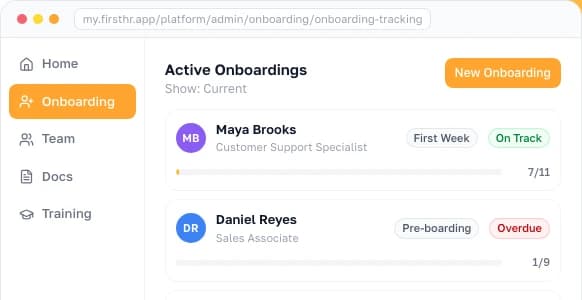
Each new hire, set up in one go
Put tasks, documents to sign and courses into one plan across five phases, then send all of it with one launch.
- AI suggests items for the role, your state and your industry
- Save a role's plan once and start the next hire from it
- A board shows who is on track and who is overdue

Why teams set up onboarding in FirstHR
Hiring soon, paperwork piling up, steps slipping as the team grows. Without a system, it looks like this.


Build the plan once, launch it, watch it run
Onboarding in FirstHR has three parts: the wizard, tracking and templates. Each one has its own page.


From invite to fully onboarded
An invite, three steps in the wizard, and nothing reaches the new hire until you launch.

Paperwork done before day one
Pre-boarding is the first phase of every plan. Whatever you put there reaches the new hire the moment you launch, once they've accepted their invite.

The new hire always knows the next step
They see one stage at a time, one card per item with a single button, and the person to ask.
See who is on track and who is stuck
Active Onboardings lists everyone in progress, as a list or as a board by stage. Late items are marked, so you see them without messaging anyone.


AI suggests items for every phase and checks the plan for legal gaps
You add what you want: nothing goes in on its own, and the check is a first pass, not legal advice. AI credits are included: 1,000 a month on Team, 3,000 on Business.

Nothing goes out by accident
You check the plan before anything goes out, and what's been signed stays signed.
Who gets an email, and when
FirstHR sends these on its own, and overdue items show on the board.
 Ryan HowardThe new hire
 Toby FlendersonInvited him and launched his onboarding
Free help for onboarding
Checklists, plan templates and generators for a new hire's first weeks, from our library. Free, and no sign-up needed.
Reviews
"Solid app with a ton of features that cover all HR needs. I'm impressed by how well the app is organized and how easy it is to navigate."
 Iskandar ChacraHead of Engineering, Ultraspeaking
"FirstHR centralises every HR process, from hiring to firing, in a sleek and user-friendly interface. Especially noteworthy is its modern design."
 Daniel RödlerCo-founder, Octomind
"There are many HR tools out there but firstHR manages to combine lots of features into one package very well and all with an affordable price tag."
 Johnberg ArslanCo-founder, AppManager
FirstHR in the press





A free trial with no strings attached
When the 7 days are up, the trial simply stops. There's no card on file, so nothing renews and there's nothing to cancel.
- Sign-up in a couple of minutes
- Every feature from day one, like the paid plans
- No credit card
- Support from real people, like the paid plans
Onboarding questions
Works together with
An onboarding hands its courses, documents and tasks to these parts of FirstHR.
Where the new hire works through it


Set up your next new hire in FirstHR
One plan for each new hire, sent with one launch, and a board that shows who is behind. Sign-up takes a couple of minutes.
- 7-day free trial
- No credit card required
- Nothing to cancel