Employee Training Tracking Software: 12 Compared
Employee training tracking software compared: simple trackers vs LMS vs HR platforms, real cost at 10 employees, and which prove compliance.

Most businesses go looking for a training tracker once a spreadsheet that worked fine stops answering questions: when a certification expires, whether a former employee finished the safety module, or which of eleven people still owes you the harassment training. I build HR software for small businesses, and before any demo I would ask you one thing: who might make you prove it?
This page starts with that question, since its answer decides which kind of product you need. It then prices every product that publishes a number at ten employees and flags the rest: nearly half the products compared here will not show a ten-person team a price without a sales call.
What makes this category confusing is that three genuinely different products answer to the same name. Some tools hold the record without delivering any training. Some deliver the training and record it as a by-product. Some attach the record to the employee file, alongside the person's documents and onboarding. They range from free plans to enterprise platforms sold only by quote.
Three kinds of product, one search term
Every product below records who completed what. The difference is what else it does, and that difference is most of what you pay for.
| Simple tracker | Learning platform | HR platform module | |
|---|---|---|---|
| Built around | The record | The course | The employee |
| Delivers training | Usually not | Yes | Yes, mostly your own material |
| Typical cost at 10 | About $45 to $90 | $119 to quote-only | $98 to $250 |
| Also gives you | Often little else | Authoring, scoring, certificates | Records, documents, onboarding |
| Best when | Training happens elsewhere | Training is scored and ongoing | Training is onboarding and policy |
| Weak when | Records must carry scores | You only wanted the log | Bought courses need a module that can load them |
FirstHR is our product and sits in the third column. We include it where it genuinely fits and list its gaps the same way we do for every other tool here: its courses are built from your own files rather than bought from a library or loaded in a packaged course standard, and two of the recommendations below route readers to competitors for exactly that reason.
Who might ask you to prove it?
This is the question that should come before price and almost never does. The answer determines how strong the record has to be, and therefore which third of the market you should be shopping in.
| Who might ask | What you have to show | What that requires |
|---|---|---|
| Nobody outside the company will ask | Internal visibility only | A shared sheet or a simple tracker is genuinely enough |
| Your insurer asks at renewal | Dated completion records | Any tool that stamps a date and exports; expiry alerts help |
| A client contract requires it | Named records per person | Per-employee records tied to the employee file |
| A regulator or inspector may audit | Defensible records with scores | A learning platform recording completion, score, and attempts |
| Certifications expire and must renew | Expiry dates and reminders | Tracking that alerts before the date, not a static log |
| You resell training to clients | Certificates and reporting | A learning platform with certificate issuance |
The reason it matters for your budget is that the requirements get expensive fast in the lower rows and cost almost nothing in the upper ones. A business whose honest answer is nobody is currently being sold platforms designed to satisfy auditors, and a business facing an inspection is sometimes running a spreadsheet that will not survive one. Deciding this first removes two thirds of the options before you compare a single feature.
12 training tracking tools at a glance
Grouped by type, then sorted within each type by what it costs a ten-person team, with quoted prices last. The published pricing column is unusually informative in this category.
| Product | Category | Entry price | Free plan | Published pricing | Full HR records |
|---|---|---|---|---|---|
| Employee Training Manager | Simple tracker | $45/mo to 30 staff | |||
| Aptien | Simple tracker | $30/seat, 3 minimum | |||
| TalentLMS | Learning platform | $119/mo to 40 users | |||
| iSpring LMS | Learning platform | $6.91/user from 100 | |||
| Trakstar Learn | Learning platform | Quote only | |||
| Absorb LMS | Learning platform | Quote only | |||
| Docebo | Learning platform | Quote only | |||
| Connecteam | HR platform | $29/hub to 30 users | |||
| FirstHR | HR platform | $98 to $198 flat | |||
| Gusto | HR platform | $49 plus $6/employee | |||
| BambooHR | HR platform | $250 flat to 25 | |||
| Rippling | HR platform | Quote, module add-on |
How we evaluated these tools
We evaluated for a US small business with no dedicated learning function, where whoever tracks the training also does several other jobs.
Simple training trackers
These are built around the record rather than around courses. If your training already happens somewhere else (in a classroom, on a job site, or through an outside provider), this is frequently all you were looking for.
Aptien is a straightforward record keeper inside a broader office platform: employees, required training, completion dates, and what falls due next. For a business whose actual problem is that nobody knows when the forklift certificates expire, this solves the problem at the price and complexity it deserves, without an implementation project or a learning strategy.
It does not deliver training. There is no hosted course content, no authoring, and no scoring, so if you were hoping to assign a video and have somebody watch it here, this is the wrong category. After the 30-day trial it bills per manager seat, with no permanent free plan to fall back on. Reporting is basic next to the learning platforms.
Employee Training Manager is built around the compliance case specifically: required training by role, evidence of completion, and renewal scheduling. For a manufacturer, contractor, or care provider whose training obligations are dictated by rules rather than by ambition, that narrowness is a feature and the interface reflects it.
Its prices are published, and the flat Starter tier covers up to thirty employees, so a ten-person team pays the same as a team of thirty. The drawbacks lie elsewhere: it delivers no training, the interface is dated compared with the newer platforms, and if your requirements later expand into onboarding or ongoing development, you will be shopping again rather than upgrading.
Learning platforms with strong tracking
These deliver the training and record it in the same place. If your training is scored, purchased, or ongoing, the record they produce is stronger than anything a simple tracker holds.

iSpring LMS, sold as iSpring Learn until October 2025, pairs the tracking with the iSpring Suite authoring tool, which works inside PowerPoint and comes with every plan. For a business whose training material already exists as decks, somebody who can build a slide can produce a quizzed, scored, tracked course, which lowers the barrier to a real record more effectively than any feature list.
Price is the weakness of this entry for a small team. iSpring publishes rates only from 100 active users, $6.91 per user a month at that tier, so a ten-person business has to request a quote.
iSpring has no permanent free plan, only a 30-day trial, and per-active-user billing means the bill grows with headcount unlike the flat-tier alternatives. The authoring advantage evaporates entirely if nobody will actually build anything.



Among the options here priced for small businesses, TalentLMS produces the strongest record: completion, score, attempts, certificates, and expiry, all exportable and all dated at the time. It is also one of the most transparent vendors in the category, with published tiers across the range.
Core at $119 covers up to forty users, so the cost per head falls as you hire rather than rising, and the free tier for five users is a genuine product rather than a demo.
At ten employees it is the second most expensive published option here, and if your honest answer to the proof question is nobody, you are paying for evidentiary strength you will not use. Moving from Core to Grow nearly doubles the bill, and several capabilities buyers assume are standard sit above Core. Authoring is basic compared with tools built for it.
Trakstar Learn handles the certification lifecycle properly: assignment, completion, certificate issuance, expiry, and reminders ahead of the renewal date. It also sits within a wider talent suite, so businesses that later want performance and engagement in the same place have a path that does not involve another migration.
Trakstar publishes no prices: the pricing page is a quote request form, so budget from a written quote. There is no free plan. For a small team whose training is a handful of onboarding modules, the certification machinery is capability you are paying for and will not open.

Absorb is a capable mid-market platform with strong compliance and certification tracking, automated enrollment rules, and reporting depth the small-business tools here do not attempt. For an organization with several hundred learners and somebody whose job is running the program, it earns its position.
Absorb publishes no prices either, and evaluation starts with a quote form rather than a signup. Circulating per-user estimates are unverified. It is listed here so you recognize the category when it appears next to a free tracker in a comparison table without any pricing context.

Docebo is among the strongest enterprise learning platforms available, with deep content management, analytics, and automation for organizations where learning has its own budget and staff. Where those conditions exist, it does things nothing else in this comparison attempts.
Scale settles it for this audience. Docebo's own pricing FAQ says it is typically best suited to companies training at least 250 learners, and the platform is designed to be operated by people a ten-person business does not employ. It appears in nearly every listicle in this category, frequently near the top, and a small business owner deserves to know why that ranking is not addressed to them.
HR platforms with training built in
These attach the training record to the employee file, next to each person's documents, their policies, and their onboarding. The argument for them is that this is where every other question about a person gets answered.

Connecteam is free at exactly the headcount this page addresses most often, and the free plan is a real product rather than a trial. Training material, completion tracking, and document storage all work, delivered through the same mobile app staff already use for schedules and messages, which is decisive for people who have no desk and no work email.
Its training record is stronger than a simple log: courses carry quizzes, accept SCORM packages (a standard format that bought courses come in), and produce exportable training records. Above ten users, the hub structure decides the cost. Training sits in one hub, operations in another, communications in a third, so wanting two doubles the base fee. For a desk-based professional team, most of the surrounding product goes unused.
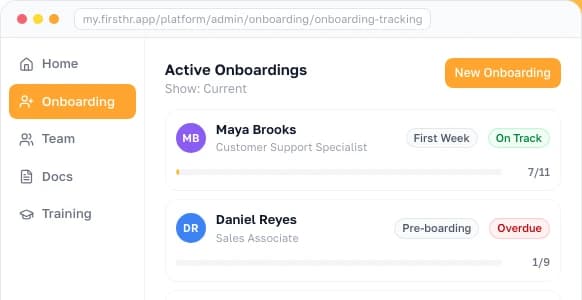
FirstHR is our product and its place here is narrow. Training modules with completion tracking sit inside an HR platform alongside onboarding workflows, e-signature, and task assignment. Pricing is flat, which means the bill does not move with every new hire.
The same platform holds employee records and document management, so a completion record lands on the same employee file as the person's signed policies and paperwork.
The platform's training is built around your own material: its Training Wizard turns files such as PDFs, slide decks, and videos into step-by-step courses, while purchased compliance courses in packaged course standards load into a learning management system instead. Payroll, benefits administration, time tracking, and scheduling sit with other tools. If your training is mostly bought courses with scored records, TalentLMS or iSpring will serve you better, and a frontline team that fits inside Connecteam's free user cap is better served there.
Gusto includes a learning feature that assigns training, tracks completion in real time, and sends automated reminders, sitting on the same platform that runs payroll and holds employee records. For a business already buying payroll, there is no second system to buy: the added cost is the course fee, charged for each participant who starts a course.
Gusto's own course content focuses on compliance topics such as anti-harassment, data security, and similar mandatory material, with state-specific variants. Broader content arrives through integrations with third-party course providers rather than natively. As a training purchase on its own it is the wrong shape, since most of the $109 buys payroll. If payroll already works elsewhere, this option does not apply to you.

BambooHR is a complete HR platform with training tracking attached, and for a company wanting one system holding employee records, onboarding, performance, and a log of who completed what, that consolidation is genuinely valuable. Compliance courses are available through a content partnership with assignment, tracking, and reporting.
The flat rate below twenty-six employees is where small buyers get caught: a ten-person business pays $250 a month, most of which buys HR capability rather than training. If tracking training is the actual problem, several options here cost a fraction of this.
BambooHR is also not a learning platform. Its bundled courses come from a partner library that grows with the plan, from one course on Core to more than 300 on Elite.

Rippling connects learning to payroll, benefits, device management, and app provisioning on one employee record, with a large course library through a content partnership. Its distinctive capability for tracking is automatic enrollment triggered by HR events: a role change or a new hire assigns the required training without anybody remembering to do it, which is exactly where manual tracking usually fails.
The module is not purchasable on its own, so evaluating it means evaluating and paying for the whole platform first. The pricing page is a custom-quote form, and the learning module has no public rate at all.
What this costs at 10 employees
Ten people, every published price, with base fees and seat inclusions counted. This is the calculation almost no ranking page in this category performs.
| Option | How it is priced | Monthly at 10 | What the number hides |
|---|---|---|---|
| Connecteam Small Business | Free for up to 10 users | $0 | All hubs on the free plan, the training hub included |
| Employee Training Manager | Starter, $45 billed annually | $45 | Flat to 30 employees; $49 if billed monthly |
| Aptien | $30 per manager seat | $90 | Three-seat minimum; 30-day trial, no free plan |
| FirstHR | $98 flat for 10 active seats | $98 | Billed monthly; about $82 a month on annual billing. Training tracking inside an HR platform, no course library |
| Gusto Simple | $49 base plus $6 per employee | $109 | This buys payroll and HR; courses are billed per participant |
| TalentLMS Core | $119 flat, covers 1 to 40 users | $119 | Same price at 10 or 40; the free tier covers 5 |
| BambooHR Core | $10 per employee, $250 flat to 25 | $250 | Core includes one compliance course; Pro includes 15 |
| iSpring LMS | Quoted below 100 users | Quote | Published rates start at 100 active users |
| Trakstar Learn | Quoted | Quote | The pricing page is a quote request form |
| Rippling | Quoted, learning is a module | Quote | Core platform plus a quoted learning module fee on top |
| Absorb LMS | Quoted | Quote | The quote form starts by asking your learner count |
| Docebo | Quoted, custom pricing | Quote | Its pricing FAQ points to 250 or more learners |
Two things fall out of it. Among the seven products that publish a price for a team this size, the range runs from nothing to $250 a month, and the free option is not a crippled trial.
The second is that a third of this comparison will not give you a training price at all. Four vendors, Rippling among them for its learning module, require a sales conversation before you learn whether they are within your budget, and iSpring requires one below 100 users. For a ten-person business, that conversation is usually an afternoon spent confirming that they are not.
How to track employee training
The software is the last decision, not the first. Businesses that buy before doing the following usually end up with an empty platform and the same spreadsheet running alongside it.
Tracking progress rather than completion is a separate step and worth doing only where it changes something. For most small businesses the useful progress signals are simple: how many people are overdue, how long items sit uncompleted after assignment, and whether the same item is always the one nobody finishes. A training matrix covering roles against requirements answers those without any reporting tool at all.
Records, expiry, and retention
Two things separate a training record that holds up from one that does not: whether it outlasts the employee, and whether you hear about an expiry before it happens. Neither appears in a feature comparison.
The second is expiry. A completion log tells you what happened; a tracker tells you what is about to lapse. If any of your training renews on a schedule, whether that is a forklift certificate, a first aid qualification, or state-mandated harassment training, the difference between the two is the entire value of the purchase. A tool without renewal alerts is a tidier spreadsheet, and for many businesses a tidier spreadsheet is genuinely all that is needed.
The renewal clocks behind those examples are often set by law rather than by preference. California requires employers with five or more employees to repeat harassment prevention training once every two years, and OSHA requires the performance of each forklift operator to be evaluated at least once every three years.
Employee certification tracking is the version of this that small businesses feel first. Each employee certification needs three things recorded: the issue date, the expiry date, and the certificate file itself, uploaded so nobody is hunting through email for a PDF the week an auditor asks.
The tool then has to warn you ahead of the date, thirty or sixty days out rather than on the morning it lapses. A lapsed forklift card or first aid qualification puts somebody off a job site or out of compliance on a client contract, and the usual way you find out is that somebody was turned away.
What an employee training database has to hold
Six fields, and the tools in this comparison differ mainly in how many of them they keep. A record with the first four answers whether somebody did the training. The last two tell you whether that is still true and let you prove it, and those are the questions that arrive with the audit rather than before it.
| Field | Why it earns its place | Where it usually goes missing |
|---|---|---|
| Person and role | Ties the completion to the employee file rather than to a course roster | Tools keyed to courses, where a leaver disappears along with the course |
| Training item and version | Shows which version of the policy or standard the person actually covered | Content edited in place, overwriting what was signed off |
| Completion date | Created at the time instead of typed in from memory later | Backfilled spreadsheets with no independent timestamp |
| Evidence | An acknowledgment, a score, attempts, or the certificate file itself | Logs that store a tick and discard the attempt behind it |
| Expiry or next due date | Turns the log into something that warns you before a lapse | Static completion lists with no renewal field at all |
| Export | Puts the record in front of an auditor, insurer, or client | Products that report on screen and export little of use |
Those six are also the fastest way to test a shortlist. Load one real employee with one real requirement during the trial, then try to produce the record from the outside: export it, read the date, find the expiry. Most tools export the record and show the date without trouble, then fall down on the expiry, and it is cheaper to learn that in an afternoon than a year in.
The verdict by team type
A single ranking assumes every small business has the same tracking problem. Across this audience the right answer changes seven times.
| Your situation | What usually fits | What to avoid |
|---|---|---|
| Frontline team under 10 | Connecteam free, with all hubs included | Paying anything; a free plan covers you completely |
| Nobody outside will ever ask | Aptien, or a spreadsheet you already maintain | Learning platforms sold on evidentiary strength |
| Regulated work, inspections possible | TalentLMS, for scored and exportable records | Completion logs that record a tick and nothing else |
| Certifications renew on staggered dates | Trakstar Learn, or any tool with expiry alerts | Static logs; renewal is the thing spreadsheets fail at |
| Somebody will build the courses | iSpring LMS, with its PowerPoint authoring tool included | Platforms whose value is content you will not use |
| Training is onboarding and policy | FirstHR at $98 flat, or Gusto if buying payroll | Per-user learning platforms priced for ongoing programs |
| Buying bought compliance courses | TalentLMS or iSpring LMS, where packaged courses load | Tools without packaged-course support, including ours |
The uncomfortable summary is that a small business with no external reporting obligation is usually served by a free plan or a tool costing under $50 a month, and the platforms ranked highest in this category are built for organizations several sizes larger with staff to operate them.
How to choose training tracking software
Five questions settle this, and the first eliminates most of the market before you open a trial.
A closing note on sequencing: write the requirements list from the tracking steps earlier on this page before you shortlist anything, then check each finalist against those specific items during the trial rather than browsing features. Most failures here are not software failures. They are a platform bought before anybody decided what was being tracked.

Frequently Asked Questions
What is employee training tracking software?
Software that records which employees completed which training, when, and when a certification expires. Three product types are sold under the name: simple trackers that hold the record without delivering training, learning platforms that deliver and record together, and HR platforms that attach the record to the employee file. Which fits depends mostly on who might ask to see the records.
How much does employee training tracking software cost?
At ten employees, from nothing to $250 a month among vendors that publish pricing. Connecteam is free to ten users, Employee Training Manager is $45 on annual billing, Aptien about $90, FirstHR $98, Gusto about $109, TalentLMS Core $119 covering up to forty users, and BambooHR $250. iSpring quotes below 100 users; Docebo, Absorb, and Trakstar Learn publish no prices; and Rippling quotes its learning module.
How do I track employee training?
Start with the list, not the software. Write down what you require, which roles it applies to, how often it repeats, and what evidence each item needs. Then name who assigns and who follows up. The tool is only where that list lives, and shortlisting becomes straightforward once the list exists.
Can I track employee training in a spreadsheet?
For a small team with training that does not expire, yes. It fails in three specific cases: staggered renewal dates nobody is reminded about, records typed in later rather than created at the time, and a file living on one person's machine. If none apply, software will improve tidiness rather than outcomes.
Is there free employee training tracking software?
Yes, and at small headcounts free is often the right answer rather than a stepping stone. Connecteam is free for up to ten users with every hub included, and TalentLMS is free forever for five users and ten courses. Elsewhere you get trials, from seven to thirty days where the vendor states a length, and the enterprise platforms start with a demo or a quote.
What is the difference between training tracking software and an LMS?
A learning management system delivers training and records it as an output. A tracker is built around the record and may host no content at all. Every LMS tracks; not every tracker delivers. If your training happens in person or through an outside provider, you may only need the record, and the record alone usually costs less.
How long do I need to keep employee training records?
It depends on the training and the rule behind it, and the clock can run past the employment. Safety records, contractually required certifications, and state-mandated training each carry their own expectations. The OSHA bloodborne pathogens standard, for example, requires training records to be kept for three years from the date of the training. The software consequence is that the record must survive deactivation, so confirm that before buying rather than after somebody leaves.
Should training records live with the employee file?
For a small business it usually helps, because that is where every other question about the person is answered. Keeping them separate makes sense when training is substantial and ongoing with scored courses and certificates, since a dedicated learning platform handles that better than an HR product does.
Make HR the easy part of running your business
Onboarding, e-signatures, training and core HR in one place. Up and running in 5 minutes.
- 7-day free trial
- No credit card required
- Cancel anytime